
I’ve long maintained a changelog for Simplify Gmail (a list of all changes) but there was no way for anyone to get an email when something new launches. Now there is.
No one is automatically subscribed so sign up if you want to get an email each time there is an update.
New features in v3.4.1
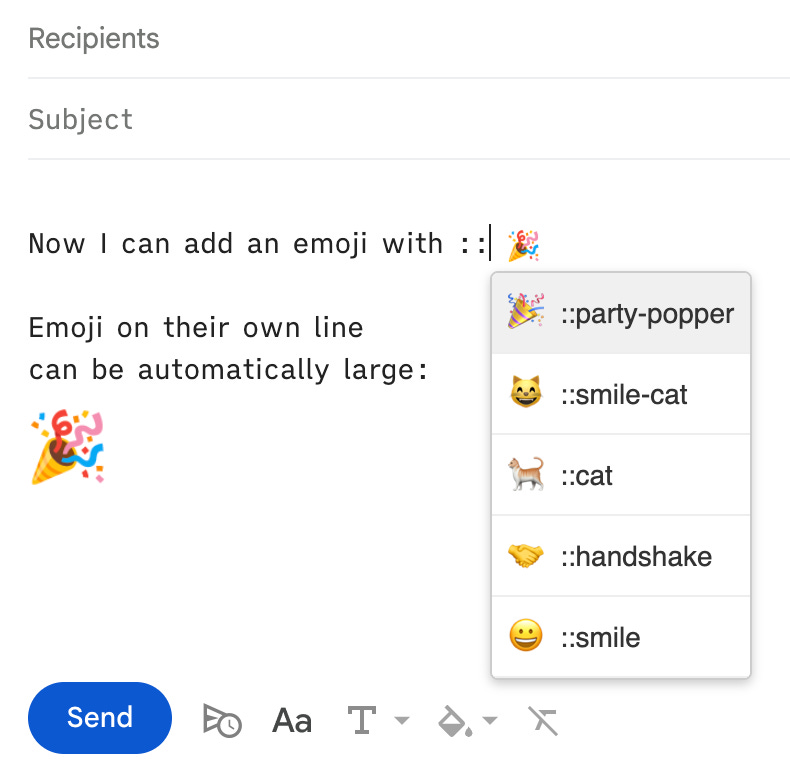
New option to auto-complete emoji with “
::”[open pref] — I used double colon instead of single to reduce false positives so I can enable this by default along. It also ships with a second option to make emoji on their own line larger when inserted via auto-complete [open pref]:
New option to put attachments above message body [open pref]
New option to hide non-attachments (links that Gmail shows as attachments like Google Drive and YouTube) [open pref]
New option to hide AI Search Overview [open pref]
New option to show list of attachments in 3-line vertical reading pane layout [open pref]
Improvements
Moved all Gemini-related preferences to one place [open prefs]
Improve how/when I hide Gemini message card buttons (e.g., Add to Calendar, Summarize message, etc) – I will improve this further in the next update
Hide the new Workspace Upgrade button (shown in top right corner next to profile photo)
A lot of small improvements to reverse order conversation view (put replies above messages and make sure it works when you pop out a conversation)
Hide Send+Archive button on reminders and change Schedule Send to “Remind me later”
Hide the Calendar icon status icon instead of trying to position it and improve the positioning of the status icon
Minor performance improvement for keyboard shortcuts
Use attr() css attribute in Chrome (other browsers don’t support this yet and I still have to have an explicit rule for every possible size)
Wrap around
`keyboard shortcut so focus can go between the last and first section when I reach the endUpdate how I scroll to a focused message to make it more performant and reliable
Fixes
Fix
ESCkey to close message by making sure any found alerts are actually visible (as I exit early if there is an open alert or menu)Fix
i, the intro keyboard shortcut (Gmail update broke it)Fix back button in search (Gmail added a Gemini-decorated search icon)
Fix storage full banner (it was being compressed to 0px wide and pushing the inbox down
Fix issue with inline reminders not being visible when the first message is collapsed
Hide the suggested reply badge in vertical reading pane too (when the pref is enabled)
Set a minimum size of 500px when you click on a profile photo in conversation view to see it larger (Gmail made many of the profile photos smaller)
Fix to fully hide the background gradient on gemini compose suggestions when Simplify prefs is enabled
Fix for Toggle Dark mode shortcut not always working
Fix minimizing the ‘Share in chat’ button and make sure the “show all” message actions button goes after the last reply/fwd button
Only round message border radius in list view on default and dark theme